
Skip to content
Hynek Kraus
Automation & AI

Let the store do the routine, not you.

Orders, invoicing, shipping, product feeds. I connect Shopify to the systems you already run and set it up so the repetitive work happens by itself. AI only where it genuinely earns its place. You get the hours back.

  • Shopify Flow and custom work through the API
  • AI where it helps, not where it sells
  • Set up once, runs on its own

No commitment · a written estimate within 24 hours

I have been there

I know what eats the day. I did it by hand.

When I ran my own Shopify store, I did plenty of it manually at first – invoices, matching payments, reprising, answering the same question for the tenth time. That taught me exactly which parts of running a store quietly eat the day. I do not automate because it is fashionable, but so you get those hours back.

Hynek Kraus, Shopify developer and consultant
Hynek KrausShopify developer and consultant

First I find what costs you the most time – then I automate. Not everything, only what actually pays for itself.

What I will do for you

What costs you hours, automation takes over.

I take the repetitive work around your operations – inside Shopify and in the systems around it – and hand it to the store. Here is what I automate most often.

Where I am different

Connecting systems & custom development

Not everything runs inside Shopify. I connect it to your warehouse, ERP, CRM and in-house tools, and build the automation around your actual process – including outside the admin, where an off-the-shelf app will not reach.

  • Warehouse, ERP and CRM through the Shopify API and webhooks
  • Custom integrations and scripts built for you
  • Whatever is specific to your business, not a stack of apps
Connect my system

Orders & workflows

Shopify Flow tags orders, holds the risky ones and pings the team – no code, right inside the store. It is free on every standard plan and I set the whole thing up for you.

  • Tagging and triage of incoming orders
  • Risky orders wait for approval
  • Alerts into email or Slack

Invoicing & accounting

The invoice is issued and sent the moment an order is placed or paid, and payments are matched by reference. I connect cloud and on-premise accounting alike.

  • Automatic invoices and payment matching
  • Xero, Lexware Office and sevDesk through app and API
  • DATEV, Lexware and Sage 50 through a connector

Shipping & stock

Once an order ships, the parcel is created, the label prints and the customer gets tracking.

  • DHL, DPD, GLS, InPost and PostNord through their apps
  • Labels and tracking automatically
  • Low-stock alerts before you run out

Feeds, price comparison & AI search

Product feeds for Google Shopping, idealo, Ceneo or Prisjakt generate and refresh themselves. And now a feed for AI as well – so ChatGPT, Perplexity or Gemini can find your products, a source of customers that is growing fast.

  • Feeds per market and per channel
  • Prices and availability updated automatically
  • A catalogue for AI search, with the purchase on your site

Reporting & profitability

Shopify shows you revenue, not profit. I gather the costs it cannot see and assemble a real margin view – automatically, not in a spreadsheet.

  • Actual profit, not just revenue
  • Counts in marketing, shipping and returns
  • AI flags where margin is slipping – you decide

Customer support

The questions that come back every day – where is my parcel, when does it arrive – can be handled automatically. And an AI agent wired to the API does the thing, rather than writing a polite sentence about it.

  • Automatic replies to repeat questions
  • Email, chat and social in one inbox
  • An AI agent that acts through the API
What it looks like in practice
  1. Customer pays
  2. Invoice in Xero
  3. DHL label
  4. Tracking email

One of the common chains. You only step in when something goes wrong.

A few minutes per order × hundreds of orders a month = easily a full working day. Illustrative – for you I work it out properly.

A real Shopify Flow

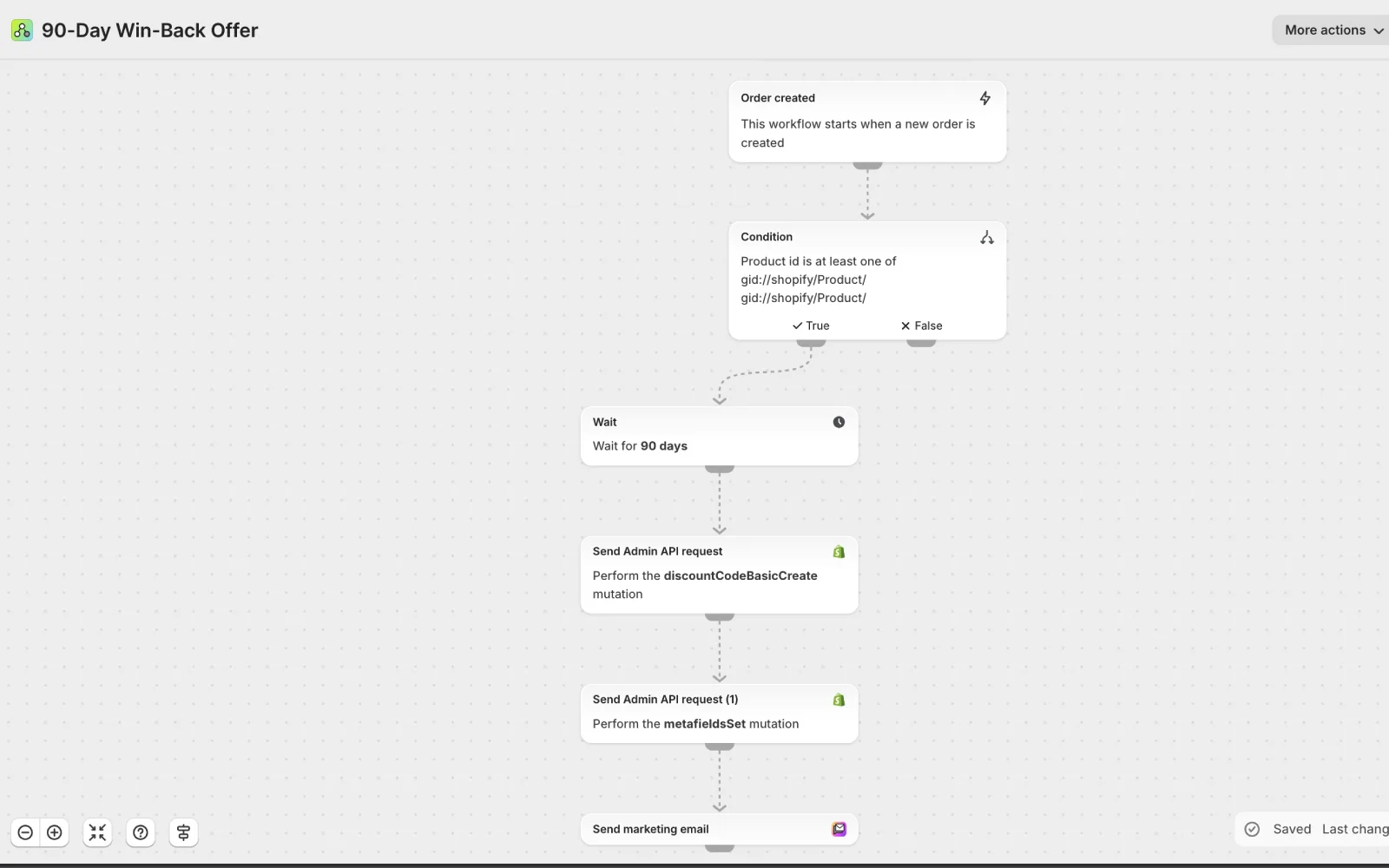
90 days after buying a particular product, Flow generates a unique discount code and emails it to the customer through Shopify Messaging – with nobody touching it. Not a mock-up: an automation running on a live store.

A real Shopify Flow generating a discount code 90 days after purchase
AI, honestly

AI helps. Not with everything equally.

There is an enormous amount of noise around AI. Here is what genuinely works on Shopify today – and where it is worth building something of your own.

What Shopify gives you free

Shopify Magic writes descriptions and emails, Sidekick helps inside the admin – free on every plan. Great for a quick start; the quality simply drifts once you move away from English, especially in longer copy.

Where I build custom

When you need hundreds of product descriptions in one consistent voice, or copy that holds up in German, French or Dutch, I wire AI straight through the API – where the native tools stop being enough.

What I will not ask AI to do

It will not double your revenue on its own and it does not replace strategy. I treat it as a tool for routine and volume, not as magic – and on anything sensitive a person stays in the loop.

Typical description

T-shirt, 100% cotton, several colours.

With my setup

A soft organic cotton tee that still holds its shape after the twentieth wash. Works with jeans and under a jacket – and in six colours there is one for everyone.

With AI through the API you pay for what you actually use – for product descriptions, tens of euros a month. I tell you the number before we start.

How it works

First I find the routine. Then I hand it to the machines.

I start by looking at where the hours go, and I work in order of payback.

  1. 01
    Routine audit

    I go through your operations and find what repeats and costs the most time – from invoices to answering the same question again.

  2. 02
    Plan & priority

    I tell you what is worth automating now and what can wait. Ranked by impact, not by what is most visible.

  3. 03
    Build & launch

    I build it – Shopify Flow, an app connection, or custom work through the API. Nothing goes live until you have approved it.

  4. 04
    Watch & tune

    I keep an eye on the automations so they run without surprises, and adjust them when your operations change.

What it costs

You pay for the time it gives back.

A simpler connection – invoicing, labels, one feed – lands in the hundreds to low thousands of euros. Complex workflows or custom AI depend on scope. I tell you the price and the saving before we start.

What drives the price

  • How many processes get automated and how tightly they are linked
  • Whether an existing app is enough or it needs custom work through the API
  • Connecting on-premise accounting (DATEV, Lexware, Sage 50) – needs a connector and an agent
  • How far the AI goes – from product descriptions to support that knows your catalogue

One-off, or with ongoing care

Most automations I set up once – you pay for the setup and the routine runs itself. With more complex AI, or when your operations keep shifting, ongoing care and development make sense. You get the scope and the price in writing before I touch anything. And if a standard app can do the job, I am not going to write you custom code – the time you save should not be spent on development.

Work out what I would save

A written ballpark within 24 hours · no commitment

Common questions

A few questions come up every time. Here are the answers.

What is Shopify Flow and do we have to pay for it?

Shopify Flow is the built-in no-code automation tool – it reacts to events in your store (a new order, a stock change) and takes an action (tags it, holds it, alerts someone). It is free on every standard plan; the one exception is Starter, which is not a full store. The catch is that a workflow worth having takes time to set up properly, and the interface is English-only. I do all of that for you.

Will automation push us onto a more expensive plan or Shopify Plus?

Almost never. Shopify Flow, automated status emails, accounting and carrier connections and AI through the API all run on the standard paid plans – automation on its own is not a reason to move to Plus. Only unusual things need it, and mostly at the largest stores: custom logic inside the checkout, for instance. If that turns out to be your case, I will say so before you commit to Plus.

Can you connect Shopify to our accounting system?

Yes. With cloud accounting like Xero, Lexware Office or sevDesk it is a direct connection through an app and the API – it runs online with nothing installed on your side. DATEV, Lexware and Sage 50 are a different story: they are desktop systems without a public cloud interface, so they are reached through a connector and a small agent installed where the accounting runs. I tell you up front what that involves; after that, issuing documents and matching payments takes care of itself.

How I build custom integrations
Can you connect our warehouse, ERP or internal system too?

Yes, and it does not have to go through an off-the-shelf app. I connect Shopify to your systems – warehouse, ERP, CRM, in-house tools – through the official Shopify API and webhooks. Something happens in the store, it lands in your system, and the other way around. Automation also does not have to live inside the Shopify admin; where it makes sense I build it alongside and connect it. That is the difference from assembling apps: whatever is specific to you gets built around your process.

Does AI on Shopify work in languages other than English?

Partly. Shopify Magic and Sidekick are free and helpful, but quality drifts in longer German, French, Dutch or Polish copy – English is where they are strongest. When you need product descriptions and support that genuinely read well in your market, I wire AI directly through the API (OpenAI or Anthropic, for instance) with rules for your brand and tone. That sidesteps the weaker native output and gives you copy you do not have to apologise for.

Where does the data go, and is it alright under GDPR?

I set it up so it is. With AI through the API I send only what the task needs – the text of a description, say – never your customer database, and I pick providers whose processing terms hold up. Accounting systems and carriers are standard processors you already have an agreement with. For every connection I tell you what data goes where, so the paperwork is clean too.

What is free and native, and what has to be built?

Shopify handles a lot on its own: Flow, automated status emails, stock alerts, basic AI copy through Magic. I set those up and you pay nothing extra for them. I go into code where the native tools stop – workflows spanning several systems, connections to accounting and carriers, AI in your market language that knows your catalogue. I always start with what is free, and build custom only when it pays for itself.

Can parcel locker and pickup point selection be automated?

Yes, through the carrier apps. The customer picks a locker or pickup point in the cart or in the checkout, and the carrier app handles it – InPost, DHL, DPD, GLS and PostNord all have one. Once the order ships, the parcel is created, the label prints and tracking goes out. And if a customer forgets to choose a point, Flow can assign the nearest one from their address so the order does not sit there.

Can returns and complaints be automated as well?

Yes. I build a self-service portal where the customer starts a return in a few clicks – return label, confirmation and the statutory deadlines included. That also covers the withdrawal function every trader selling to EU consumers has had to provide since 19 June 2026 under Article 11a of the Consumer Rights Directive: withdrawing has to be at least as easy as ordering was, and the rule binds non-EU traders selling into the EU too. I connect Returnless or ReturnGO, or build it custom; with a faulty-goods complaint the portal handles intake and messaging, but judging the fault stays with a person.

What if an automation gets it wrong?

That is exactly why I do not switch one on blind. Every automation gets tested and rolled out carefully, and on anything sensitive – money, cancelling orders – I leave a checkpoint or a person in the loop. Then I keep watching that it runs reliably. The point is to save you time, not to hand you a new worry.

Who owns the automations if we stop working together?

Everything runs on your Shopify account and your credentials; custom code and connections are handed over with documentation. No lock-in – the automations keep running whether you continue on your own or with someone else. I am not holding you by making something break without me.

How long does it take to go live?

A simple connection – invoicing, labels, one feed – is usually a matter of days. Workflows spanning several systems, or AI work, run to weeks depending on scope. But I start with the routine audit and tell you what is worth taking first; the schedule comes with the quote.

What does automation cost?

It depends on scope. A simpler connection lands in the hundreds to low thousands of euros, complex workflows or custom AI higher. Most of it I set up once and then it runs by itself. Send me a few sentences about what you are doing by hand today and within 24 hours you will have a written ballpark. Free, and no call needed.

Get a ballpark figure
Will this mean paying for more apps?

Sometimes yes – for shipping, feeds or invoicing there are proven apps for tens of euros a month, and building those from scratch would never pay off. I always tell you the monthly cost up front and whether an app or custom code is the better buy. Subscriptions run on your account, not through me – and when a proven app beats custom code, I say so.

When is automation not worth it?

When you do something rarely or at low volume – setting up the automation would cost more time than it saves. It pays off on what repeats often and costs you hours. If leaving something manual works out better for you, I will say so straight away.

First step

Tell me what slows you down most.

Write a few lines about what you are doing by hand today. Within 24 hours you will have 3 to 5 routines worth automating first, in writing, with an estimate of the saving and the cost. No call, no commitment.

Would rather not fill anything in? Write straight to ahoj@hynekkraus.cz

  1. 01You fill in a short form. It takes two minutes.
  2. 02Within 24 hours I reply with a first written read on it. Free.
  3. 03What happens next is your call. I will not chase you.